
versaSRS Help & Service Desk - ITSM/ITIL6.0 - Download
You'll be able to download in few seconds.
Publisher Description
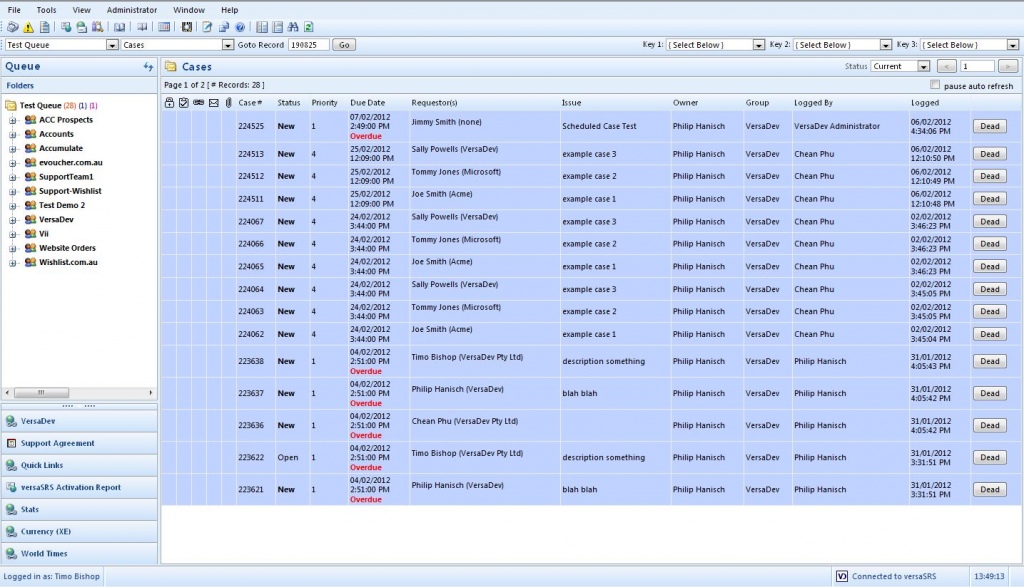
versaSRS provides a flexible and scalable solution for managing help desk and service request processes and providing cost effective solutions to end users and customers. Although a browser-based application, versaSRS Help Desk does not look like a traditional Webpage, instead it has been designed to work as a desktop application, providing the benefits of an intuitive interface with the latest advancements in browser technology. versaSRS Features: Thin Client Technology (100% Web Browser-based); Fully email enabled; Searchable Knowledge Database; Full Management Assign Capabilities; File Attachments; Report Writing; Fast Issue Logging; Easy Re-Assignment to an Individual or Skill Group; New Issue and Due Date Alerts; Escalations; Parent / Child Relationships; Work Requests (Actions); Action Escalations; Billing Module; Asset Management; Contacts Manager; Automated email and Watcher Notifications; Customizable Prioritisation of Issues; Comprehensive Audit Trail and History; Comprehensive Templating capabilities; Scheduler; Event Manager; Customizable System Labeling; Customizable Look-up-lists; Customizable Forms Creation; and much much more...
About versaSRS Help & Service Desk - ITSM/ITIL
This Helpdesk & Remote PC program is available in English. It was last updated on 29 September, 2026. versaSRS Help & Service Desk - ITSM/ITIL is compatible with the following operating systems: Windows.
The company that develops versaSRS Help & Service Desk - ITSM/ITIL is VersaDev. The latest version released by its developer is 6.0.
The download we have available for versaSRS Help & Service Desk - ITSM/ITIL has a file size of 19.9 MB. Just click the green Download button above to start the downloading process. The program is listed on our website since 2014-04-07 and was downloaded 0 times. We have already checked if the download link is safe, however for your own protection we recommend that you scan the downloaded software with your antivirus. Your antivirus may detect the versaSRS Help & Service Desk - ITSM/ITIL as malware if the download link is broken.
How to install versaSRS Help & Service Desk - ITSM/ITIL on your Windows device:
- Click on the Download button on our website. This will start the download from the website of the developer.
- Once the versaSRS Help & Service Desk - ITSM/ITIL is downloaded click on it to start the setup process (assuming you are on a desktop computer).
- When the installation is finished you should be able to see and run the program.
Program Details
System requirements
Download information
Pricing
Version History
version 6.0
posted on 2014-04-07
Disclaimer
External Download
We do not host versaSRS Help & Service Desk - ITSM/ITIL on our servers. We did not scan it for viruses, adware, spyware or other type of malware. This app is hosted by the software publisher and passed their terms and conditions to be listed there. We recommend caution when installing it.
The external download link for versaSRS Help & Service Desk - ITSM/ITIL is provided to you by apps112.com without any warranties, representations or guarantees of any kind, so access it at your own risk.
If you have questions regarding this particular app contact the publisher directly. For questions about the functionalities of apps112.com contact us.
